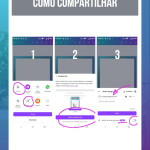




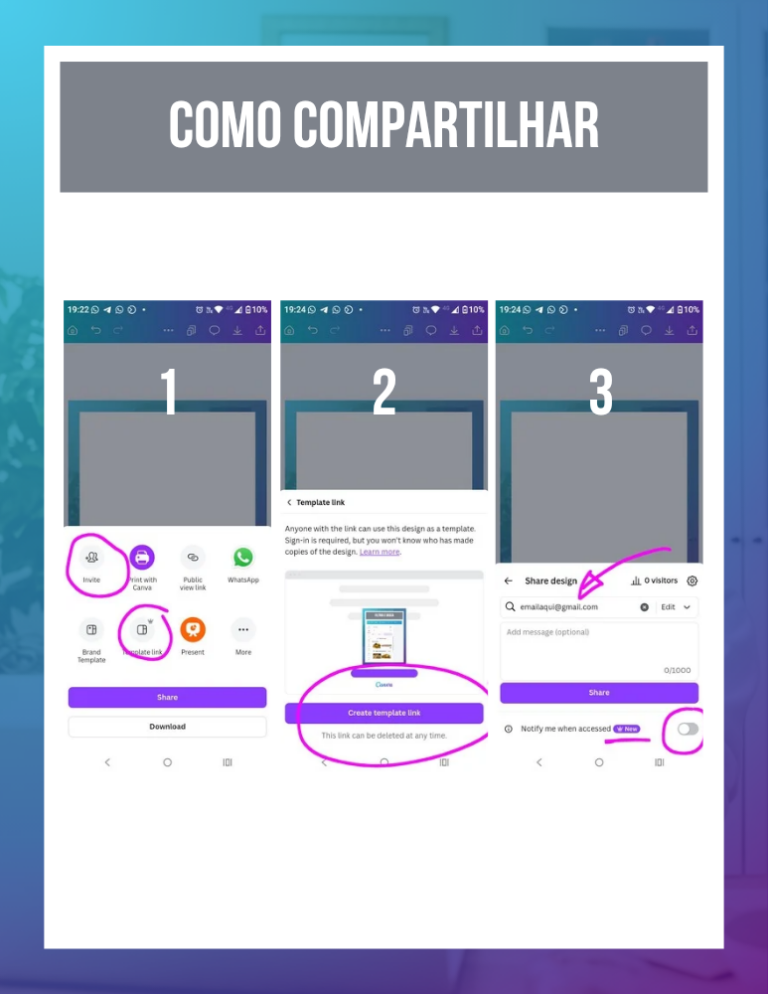
The quick answer: Use the Share in the top right-hand corner to define who can view, comment on or edit your design. The innovation lies in the practical automation of approval and collaboration processes, eliminating the excessive sending of files by email and keeping all conversation centralized within the project.
1. Professional and organized collaboration
In everyday life, sending “prints” for approval is a slow and amateurish process. The innovation lies in inviting the person to see the design in real time. This allows feedback to be made through comments stuck to the elements, which brings enormous clarity and avoids misinterpretations. We're here to show you that design can be a fluid and stress-free process.
2. Link types: Protecting Your Work
You have full control over what the other person can do. Use the “Preview Link” for proposals that can't be changed, or the “Template Link” if you're handing over material for a student to edit in their Canva. The practical innovation is to ensure that your original file is never modified by a third party without your permission.
When receiving feedback, use the reply comments function within Canva. Innovation lies in transforming your design into a living communication hub. This professionalizes your delivery and shows your client or partner that you have mastered high-performance tools and project management.
Canva Ultra Fast Course
Complete Canva course. Less than 2 hours to master the tool.